DESIGN CONCEPT
DESIGN CONCEPT
Chase Bank
Transaction Filters
Chase Bank
Transaction Filters
Simplifying Complex Financial Interactions Through Thoughtful Interaction Design
Simplifying Complex Financial Interactions Through Thoughtful Interaction Design
THE PROBLEM
THE PROBLEM
Five Steps Too Many
Five Steps Too Many
Chase's current transaction filtering system requires multiple steps, making it challenging for users (including myself) to quickly find specific transactions. I focused on the usability of this action and making it a more seamless experience, rather than giving up and not finding what you're looking for.
Chase's current transaction filtering system requires multiple steps, making it challenging for users (including myself) to quickly find specific transactions. I focused on the usability of this action and making it a more seamless experience, rather than giving up and not finding what you're looking for.
THE CHALLENGE
THE CHALLENGE
It's Not Just a Visual Problem
It's Not Just a Visual Problem
The core issue is interaction design, not visual polish alone. Users face cognitive friction trying to complete a simple task: finding specific transactions. The current system creates unnecessary steps between user intent and task completion, so the visual design had to change too, to support a shorter, clearer path.
The core issue is interaction design, not visual polish alone. Users face cognitive friction trying to complete a simple task: finding specific transactions. The current system creates unnecessary steps between user intent and task completion, so the visual design had to change too, to support a shorter, clearer path.
PAIN POINTS
PAIN POINTS
Where Users Get Stuck
Where Users Get Stuck
Multi-Step Navigation
Users must navigate through multiple screens and modals just to apply basic filters, breaking their mental flow.
Multi- Step Navigation
Users must navigate through multiple screens and modals just to apply basic filters, breaking their mental flow.
Visual Overload
Dense, text heavy transactions list makes it difficult to quickly scan and identify specific transaction types.
Visual Overload
Dense, text heavy transactions list makes it difficult to quickly scan and identify specific transaction types.
Slow Task Completion
What should take 2-3 steps takes 5+, turning a simple task into a slow one.
Slow Task Completion
Simple filtering tasks take 5+ interactions when they should take 2-3, creating user frustration.
THE SOLUTION
THE SOLUTION
Rethinking the Filter
Rethinking the Filter
By looking at diverse digital platforms, not just finance or fintech, I found filter systems that felt seamless. Airbnb, for example, uses filter pills you can tap through and a draggable date range for your stay, small interactions that move you smoothly from one step to the next without ever feeling like a separate task. That kind of seamlessness inspired my approach: pills with icon and label to quickly identify transaction categories, and a draggable picker to select a date range, streamlining filtering into fewer, more intuitive steps.
By looking at diverse digital platforms, not just finance or fintech, I found filter systems that felt seamless. Airbnb, for example, uses filter pills you can tap through and a draggable date range for your stay, small interactions that move you smoothly from one step to the next without ever feeling like a separate task. That kind of seamlessness inspired my approach: pills with icon and label to quickly identify transaction categories, and a draggable picker to select a date range, streamlining filtering into fewer, more intuitive steps.
STRATEGY
STRATEGY
From Configuration to Browsing
From Configuration to Browsing
Transform filtering from a "configuration task" into "natural browsing behavior." Instead of setting up filters, users scan filter pills and a draggable date picker, immediately actionable, visually clear, and still consistent with Chase's trusted design language.
Transform filtering from a "configuration task" into "natural browsing behavior." Instead of setting up filters, users scan filter pills and a draggable date picker, immediately actionable, visually clear, and still consistent with Chase's trusted design language.
SOLUTION 1
SOLUTION 1
Visual Transaction Categories
Visual Transaction Categories
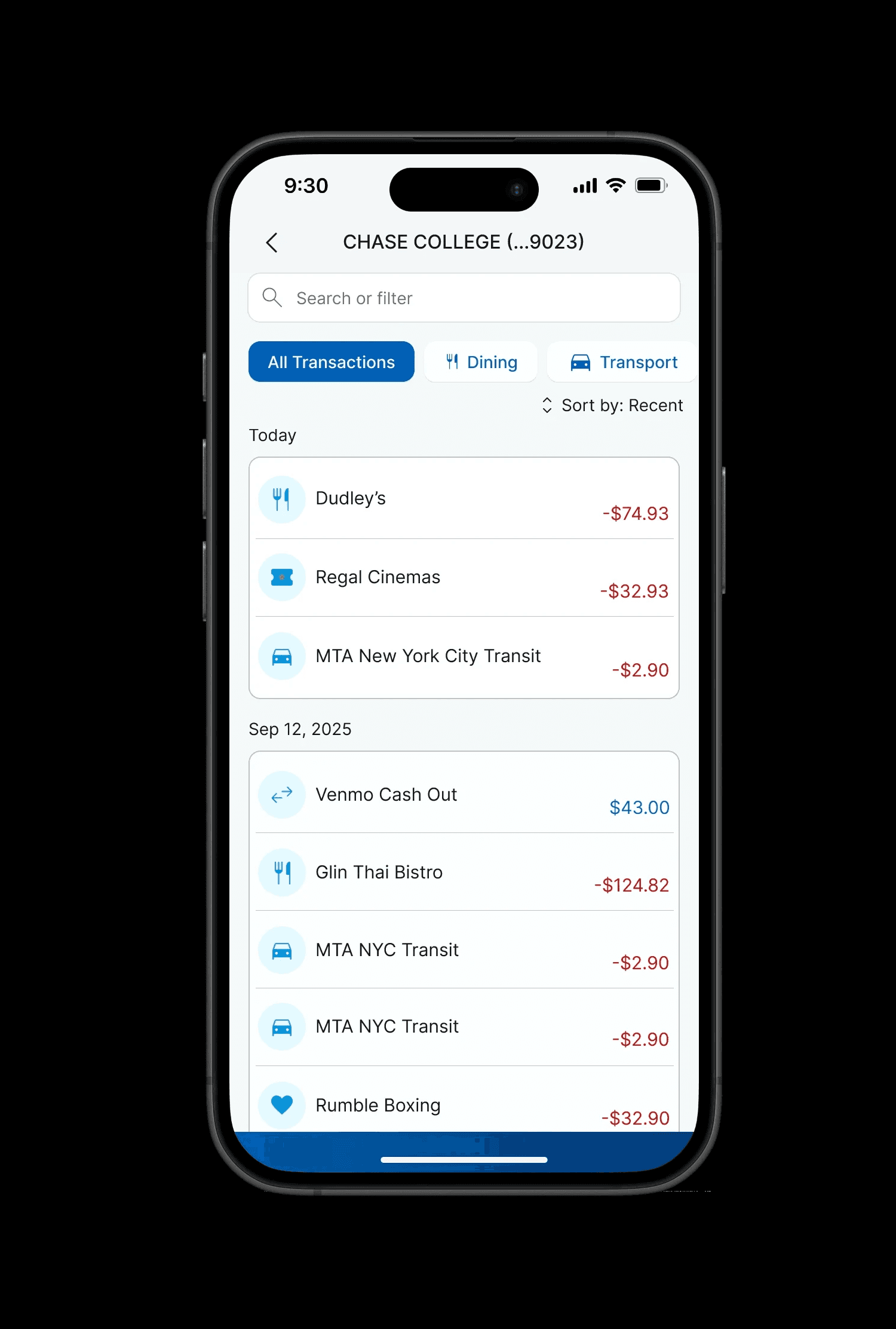
Icons are immediately captivating and scannable, so I focused on adding a visual that represents each transaction category at a glance. This redesign creates a cleaner, less cluttered view while enabling easy filtering by category.
Icons are immediately captivating and scannable, so I focused on adding a visual that represents each transaction category at a glance. This redesign creates a cleaner, less cluttered view while enabling easy filtering by category.

After
Before
After
Before
SOLUTION 2
SOLUTION 2
Smart Date Range Selection
Smart Date Range Selection
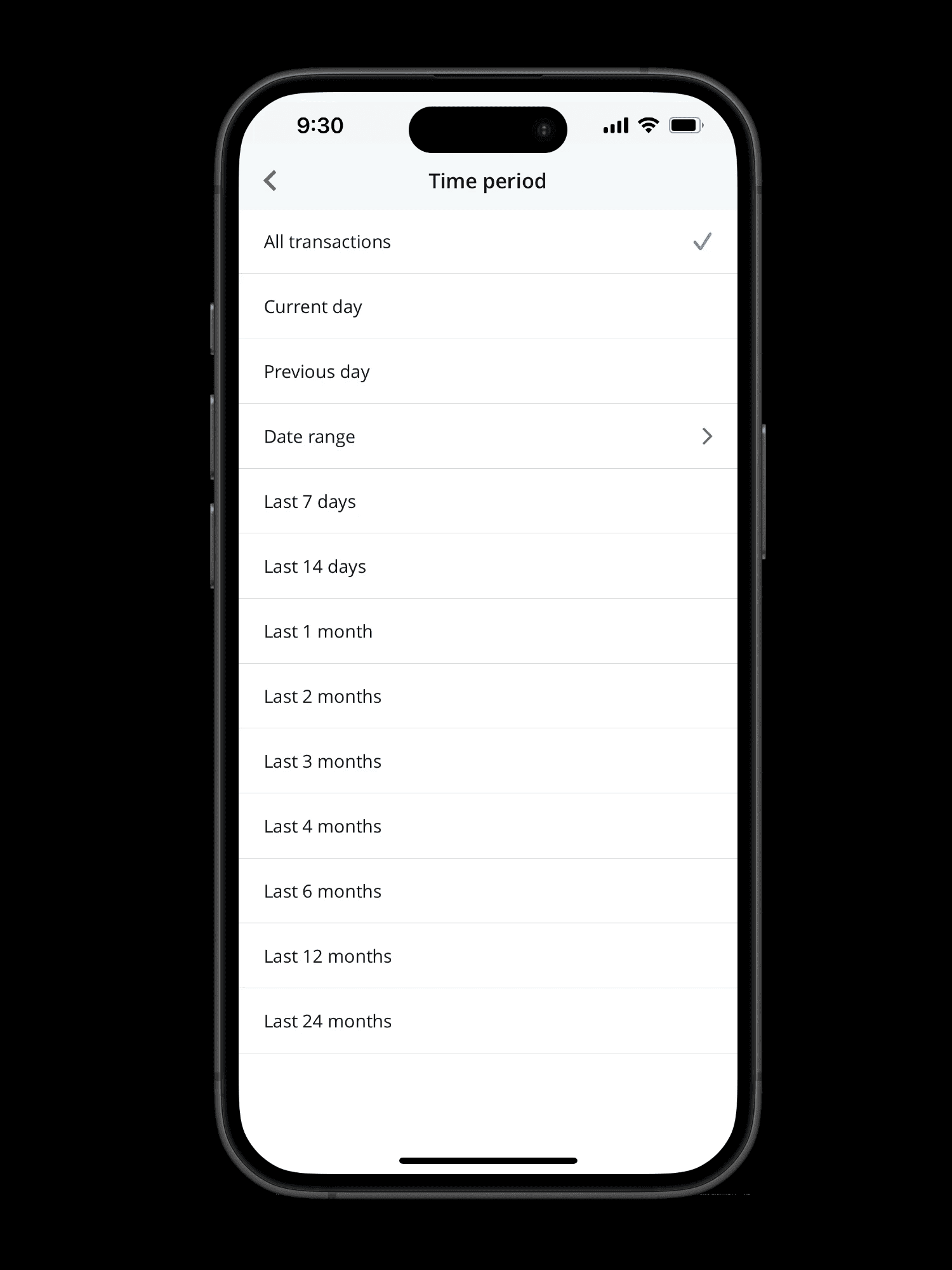
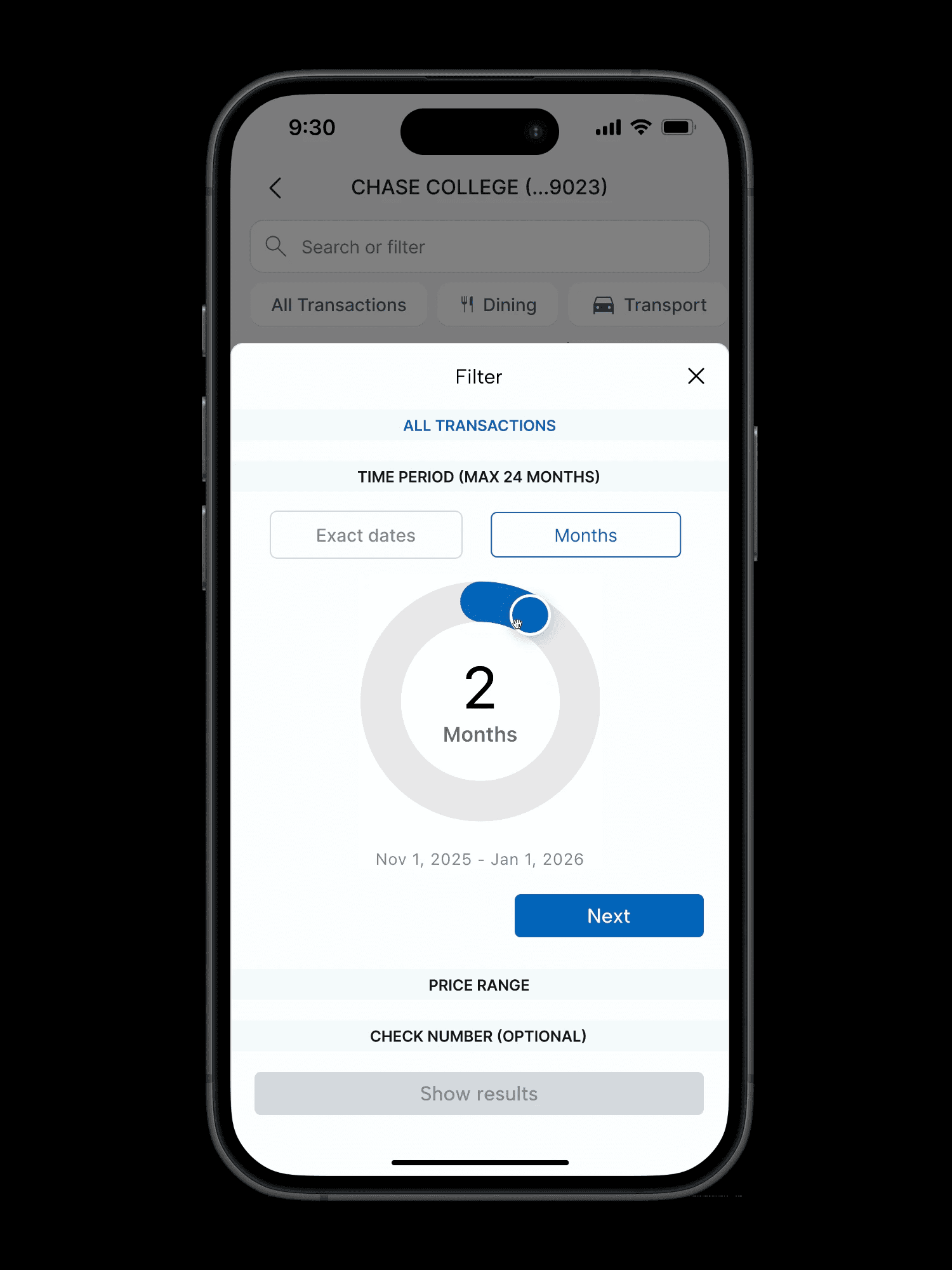
Adding two ways of selecting dates felt important, since users' needs shift depending on whether they're hunting for one specific transaction or scanning a broader window. Exact dates work best for something specific, like verifying a charge on a certain day, while the new date range picker lets users select months at once. This makes it easy to quickly analyze transactions over a longer period, from a few days to several months, without applying filters one at a time.
Adding two ways of selecting dates felt important, since users' needs shift depending on whether they're hunting for one specific transaction or scanning a broader window. Exact dates work best for something specific, like verifying a charge on a certain day, while the new date range picker lets users select months at once. This makes it easy to quickly analyze transactions over a longer period, from a few days to several months, without applying filters one at a time.



After: Simplified filter
Before: Complex Filter
Before: Complex Filter
After: Simplified filter
RATIONALE
RATIONALE
Why It Could Work
Why It Could Work
Cognitive Load Reduction
Icons let users recognize a transaction type visually, before reading any text, reducing the mental effort it takes to scan a list.
Cognitive Load Reduction
Icons allow users to process information visually before cognitively, reducing mental effort required to scan transactions.
Mobile First Interaction
Redesigned touch targets and simplified gestures optimize the experience for one-handed mobile use.
Mobile First Interaction
Redesign touch targets and simplified gestures optimize the experience for one-handed mobile use.
Interaction Efficiency
Smart presets are designed around the 80/20 principle, the idea that a small set of options covers most user needs, minimizing interaction for the majority of use cases.
Interaction Efficiency
Smart presets address 80% of user needs with minimal interaction, following the 80/20 principle.
TAKEAWAYS
TAKEAWAYS
What I'd Do Differently
What I'd Do Differently
Looking back, I would have liked to do more user research, specifically with Chase customers, to see where real friction shows up and whether the redesign actually feels familiar to their trusted brand, not just intuitive in general. As a customer myself for several years, this problem felt personal, and that's part of why filters stood out to me: they're often a make-or-break moment in a product. Given more time, I'd also want to build out more of Chase's existing design system to stay as consistent as possible.
Looking back, I would have liked to do more user research, specifically with Chase customers, to see where real friction shows up and whether the redesign actually feels familiar to their trusted brand, not just intuitive in general. As a customer myself for several years, this problem felt personal, and that's part of why filters stood out to me: they're often a make-or-break moment in a product. Given more time, I'd also want to build out more of Chase's existing design system to stay as consistent as possible.
Want to talk through the process?
NEXT CASE STUDY
Want to talk through the process?
NEXT CASE STUDY